You'll hear that SVG is always smaller and always sharper than PNG. That's mostly true, but not entirely.
For a simple icon shown at exactly one size on a standard display, a PNG can be the same size as the SVG or even smaller. The math changes once pixel density, theming, and the file's destination come into it.
Below I go through those trade-offs with numbers measured from real icon files, not rules of thumb.
What each format actually stores
A PNG is a grid of pixels. A 24×24 PNG stores 576 pixels, each with red, green, blue, and alpha values, compressed losslessly. Whatever resolution you exported is the most detail the file will ever have.
An SVG is a text description of shapes. Here is the complete house icon from Lucide (lucide-react 0.460.0), exactly as it renders to markup with a black stroke:
<svg xmlns="http://www.w3.org/2000/svg" width="24" height="24"
     viewBox="0 0 24 24" fill="none" stroke="#000" stroke-width="2"
     stroke-linecap="round" stroke-linejoin="round">
  <path d="M15 21v-8a1 1 0 0 0-1-1h-4a1 1 0 0 0-1 1v8"/>
  <path d="M3 10a2 2 0 0 1 .709-1.528l7-5.999a2 2 0 0 1 2.582 0l7 5.999A2 2 0 0 1 21 10v9a2 2 0 0 1-2 2H5a2 2 0 0 1-2-2z"/>
</svg>
Nothing in that file refers to pixels. The viewBox sets up a 24-unit coordinate system, the two path elements describe the outline, and stroke-width="2" says the lines are 2 units thick.
The browser turns that description into pixels at display time, at whatever size and density the screen needs. Almost every difference between the two formats comes from this.
File size, measured
To get real numbers, I rendered two Lucide icons to SVG with react-dom/server, then rasterized each one to PNG with sharp 0.34.5 using its default PNG settings (no extra optimization). The SVG sizes are raw bytes, with the gzip -9 size in parentheses, which is roughly what a server sends when compression is on.
Measured on lucide-react 0.460.0, the version Icony ships; newer releases add icons but keep the same drawing rules. The SVGs were rendered with a black stroke, as in the markup above. With the component's default stroke="currentColor" each file is 8 bytes larger (house 402 B, settings 840 B), which is the figure other pages on this site quote.
- house (2 simple paths): SVG 394 B (250 B gzipped). PNG 16px: 294 B · 24px: 337 B · 48px: 603 B · 72px: 824 B · 180px: 2,255 B · 512px: 8,211 B.
- settings (a gear with many curves): SVG 832 B (370 B gzipped). PNG 24px: 493 B · 48px: 1,095 B · 72px: 1,631 B · 512px: 16,313 B.
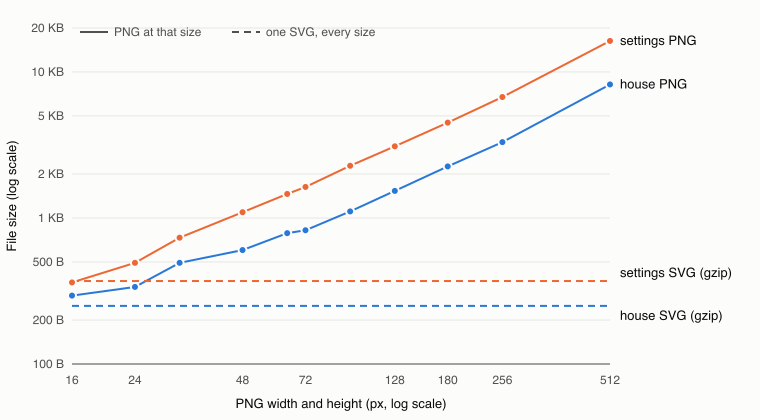
The numbers show some things the usual advice skips:
- At 1× and 24px, the PNG house (337 B) is smaller than the uncompressed SVG (394 B). For a single low-resolution use, PNG isn't wasteful.
- PNG size grows with pixel area. SVG size grows with path complexity. The gear's SVG is about twice the size of the house's, and so is its 512px PNG. Complexity costs you in both formats.
- A retina-ready PNG setup needs 1×, 2×, and 3× files (337 + 603 + 824 = 1,764 B for the house). One 250 B gzipped SVG covers all three and every size after that.
- PNG is already compressed, so gzip on the server does very little for it. SVG is text: gzip cut the house by 36.5% and the gear by 55.5%.
These numbers come from unoptimized files. Running SVGO on the SVG or oxipng on the PNG will shrink both a bit, but it won't change which way the comparison goes.
Sharpness and pixel density
A 24px icon in CSS isn't 24 physical pixels on most modern screens. On a 2× display it covers 48×48 device pixels, on a 3× phone 72×72, and on a Windows laptop at 150% scaling 36×36.
The browser redraws an SVG from its geometry for each case. A PNG gets resampled from whatever pixels it has, so a 24px PNG on a 2× screen is stretched to twice its size and looks soft.
To see how much softer, I put the 24px house PNG and the house SVG side by side at 24 CSS pixels in headless Chromium with a device scale factor of 2, then captured the 48×48 device pixels each one produced. In the stretched PNG, 84.2% of the drawn pixels were partly transparent. In the SVG, which was drawn fresh at 48px, it was 20.2%.
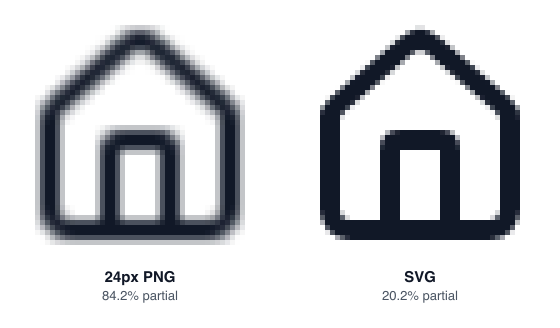
With PNG you fix this by shipping one file per density and letting the browser choose, which means more files to export, name, and keep in sync:
<!-- PNG: one file per pixel density -->
<img src="/icons/home-24.png"
     srcset="/icons/home-24.png 1x, /icons/home-48.png 2x, /icons/home-72.png 3x"
     width="24" height="24" alt="Home" />

<!-- SVG: one file for every density -->
<img src="/icons/home.svg" width="24" height="24" alt="Home" />
That covers the common 1×/2×/3× cases, but 1.25×, 1.5×, and browser zoom will still resample one of those files. The SVG never needs resampling.
Color, theming, and states
A PNG has its color baked in, so a dark-mode or error version is another file. An SVG that uses currentColor follows the CSS color of its parent, as long as CSS can reach it, which depends on how you embed it. This comparison of embedding methods measures inline SVG, <img>, components, CSS masks and sprites on exactly that point.
Where PNG is still the right answer
- Email. Support is better than its reputation. caniemail.com's table for SVG images lists most major clients as supporting it. But it's inconsistent. Gmail, for example, is marked partial because it converts the SVG to PNG. When a newsletter has to look the same everywhere, a PNG at 2× the display size is still the safe bet.
- Social preview images (
og:image, Twitter/X cards). Use a PNG or JPEG. Link-preview crawlers aren't built to render arbitrary SVG. - Google Search favicons. Google doesn't list SVG among its supported favicon formats, so provide a raster favicon even if browsers are happy with your SVG. How to make a favicon covers the exact files.
- Upload forms that reject SVG. WordPress, for example, doesn't allow SVG uploads without a plugin, because SVG is XML that can contain scripts. Plenty of CMSes and marketplaces do the same.
- App store and OS assets. App icons, splash screens, and store listings ask for fixed-size raster files.
- Very detailed artwork. An illustration with thousands of paths, gradients, and filters can be larger as SVG than as a PNG or WebP, and slower to render. Icons are almost never in this group.
A note on security
Because SVG is a document format, it can contain <script>, event handlers, and links to external resources. An SVG loaded through <img> or CSS doesn't run scripts, but an SVG you inline into the page or open directly in the browser can.
For icons from a trusted library this doesn't matter. For SVGs that users upload, sanitize them, or rasterize them to PNG on the server, before you display them.
Five ways icon files go wrong
- Exporting a PNG at 1× for a retina UI. It looks fine on the designer's external monitor and blurry on every laptop. Export at 2× the display size, or use SVG.
- A fake SVG. Some tools "export SVG" by wrapping a bitmap in an
<image href="data:image/png;base64,…">tag, so you get a larger file with all the limits of a PNG. The blurry icons guide has a one-line check for it. - Hard-coded colors in the SVG.
fill="#000000"on every path stopscurrentColortheming. Replace fixed colors withcurrentColorwhere the icon is a single color. - Leaving out
widthandheighton<img>. Without them the browser can't reserve space before the file loads, and the layout shifts. Set them on SVG and PNG images alike. - Inlining the same large SVG hundreds of times. Each inline copy adds to your HTML. For icons repeated across a long list, use an
<img>that gets cached, a mask, or an SVG sprite with<use>.
FAQ
Is WebP better than PNG for icons? WebP's lossless mode usually makes smaller files than PNG, and modern browsers support it. It's still a raster format, though, so you face the same density problem. It's a better PNG, not a replacement for SVG.
Can I turn a PNG back into an SVG? Only by tracing it, which guesses at the outlines and rarely matches the original geometry, especially at icon sizes. Find the original vector instead. Most open-source icon sets publish SVG sources.
Do SVG icons slow down rendering? For typical UI icons with a handful of paths, not in any way you'll notice. Rendering cost becomes a real concern with complex illustrations, heavy filters, or thousands of inline icons on one page.
Quick decision checklist
- Will a browser or a modern app framework render it? Use SVG.
- Does it need to change color with theme or state? Use inline SVG or the CSS mask technique.
- Is it going into email, a social card, an app store, a search-engine favicon, or an upload form that rejects SVG? Use PNG, exported at the largest size it will be shown (2× for email).
- Is it a photo or a heavily detailed illustration? Use a raster format (PNG, WebP, or AVIF) rather than an icon workflow.
- Either way, keep the SVG as the source of truth and generate PNGs from it when a destination asks for them. Icony's export works this way: every icon starts as SVG markup, and the PNG is rendered from that markup at the size you choose.