Lucide, Tabler, and Heroicons look similar in a screenshot: outline icons, rounded line ends, drawn on a 24×24 grid. Install them and the differences show up in the details: how many icons each one has in the categories you care about, what markup it renders, what its React components accept, and what it does for accessibility out of the box.
Everything below comes from the packages installed in a real Next.js project: lucide-react 0.460.0, @tabler/icons-react 3.36.1 (plus the raw @tabler/icons SVGs), and @heroicons/react 2.2.0. These are the versions Icony ships; newer releases add icons but keep the same drawing rules. Where I give a number, I say how I got it, so you can re-run the check against newer versions.
The short answer
- Lucide is the best default for app UI: large enough for most products, very consistent, and it gives you the most control over stroke width.
- Tabler is the one to pick when coverage matters most: niche objects, file types, and hundreds of brand logos. About one in five outline icons also has a filled twin (1,001 of 4,985).
- Heroicons is the one to pick when you want a small, carefully drawn set. It comes in four styles across three sizes (24px outline and solid, 20px solid, 16px solid), hides itself from screen readers by default, and fits Tailwind projects well.
The numbers, measured
I counted icon files in each package’s node_modules folder. Lucide’s icon folder has 1,742 files, but 203 of them only re-export another icon under an older name (for example Home is an alias of House), so the real count is the 1,539 files that call createLucideIcon.
- Lucide 0.460: 1,539 icons. Outline only. ISC license.
- Tabler 3.36: 4,985 outline icons and 1,001 filled icons (5,986 SVG files). MIT license.
- Heroicons 2.2: 324 icons, each in 24px outline, 24px solid, and 20px solid; 316 of them also come as 16px solid “micro” icons. MIT license.
Raw totals hide where each set runs thin, so I also counted by name prefix (arrow-* and file-*), using unique icons only: aliases are excluded, and Tabler’s count is outline only. This is rough, since names don’t map perfectly to categories, but the gaps are large enough to matter:
- Arrows: Lucide 42, Tabler 144, Heroicons 53 (outline).
- Files and documents: Lucide 58 (
file-*), Tabler 95 (file-*), Heroicons 16 (Document*). - Brand logos: Tabler has 370
brand-*icons. Lucide still ships 17 (GitHub, Figma, Slack and others), but its type definitions mark them@deprecatedwith a note that brand icons are due to be removed. Heroicons has none.
If your product needs logos for sign-in buttons or integrations, that decides it before style does: Tabler has them, the other two do not (or will not for long). A dedicated brand set like Simple Icons is the other option.
What each one actually renders
Here is the same “home” icon from each library, rendered to a string with react-dom/server and trimmed slightly for width. The differences are small, but they show:
<!-- Lucide 0.460: <House size={24} /> -->
<svg width="24" height="24" viewBox="0 0 24 24" fill="none" stroke="currentColor"
     stroke-width="2" stroke-linecap="round" stroke-linejoin="round" class="lucide lucide-house">
  <path d="M15 21v-8a1 1 0 0 0-1-1h-4a1 1 0 0 0-1 1v8"/>
  <path d="M3 10a2 2 0 0 1 .709-1.528l7-5.999a2 2 0 0 1 2.582 0l7 5.999A2 2 0 0 1 21 10v9a2 2 0 0 1-2 2H5a2 2 0 0 1-2-2z"/>
</svg>

<!-- Tabler 3.36: <IconHome size={24} /> -->
<svg width="24" height="24" viewBox="0 0 24 24" fill="none" stroke="currentColor"
     stroke-width="2" stroke-linecap="round" stroke-linejoin="round" class="tabler-icon tabler-icon-home">
  <path d="M5 12l-2 0l9 -9l9 9l-2 0"/>
  <path d="M5 12v7a2 2 0 0 0 2 2h10a2 2 0 0 0 2 -2v-7"/>
  <path d="M9 21v-6a2 2 0 0 1 2 -2h2a2 2 0 0 1 2 2v6"/>
</svg>

<!-- Heroicons 2.2: <HomeIcon /> (24/outline) -->
<svg fill="none" viewBox="0 0 24 24" stroke-width="1.5" stroke="currentColor"
     aria-hidden="true" data-slot="icon">
  <path stroke-linecap="round" stroke-linejoin="round" d="m2.25 12 8.954-8.955c.44-.439 1.152-.439 1.591 0L21.75 12M4.5 9.75v10.125c0 .621 ..."/>
</svg>- Lucide and Tabler render almost the same
<svg>attributes: a 2-unit stroke, round caps and joins,fill="none", andcurrentColor. Put them side by side and the line weight matches. The drawings differ, though: Lucide’s house is one closed outline with rounded corners, while Tabler draws the roof as a separate line whose eaves stick out past the walls. - Heroicons uses a 1.5-unit stroke. At the same size, its icons look lighter. Mixing Heroicons with either of the others in one toolbar is the most common way to end up with a row that looks slightly off.
- Heroicons omits
widthandheight. The icon has only aviewBox, so it takes its size from CSS. Without a class, it grows to fill its container. - Tabler’s raw SVG files differ from its React output. The files in
@tabler/iconsadd an invisible bounding-box path and a longer class list that the React components leave out. That path can catch you when you recolor copied files; the icon color guide shows how.
Rendered at the sizes toolbars actually use, the stroke difference is easy to see:
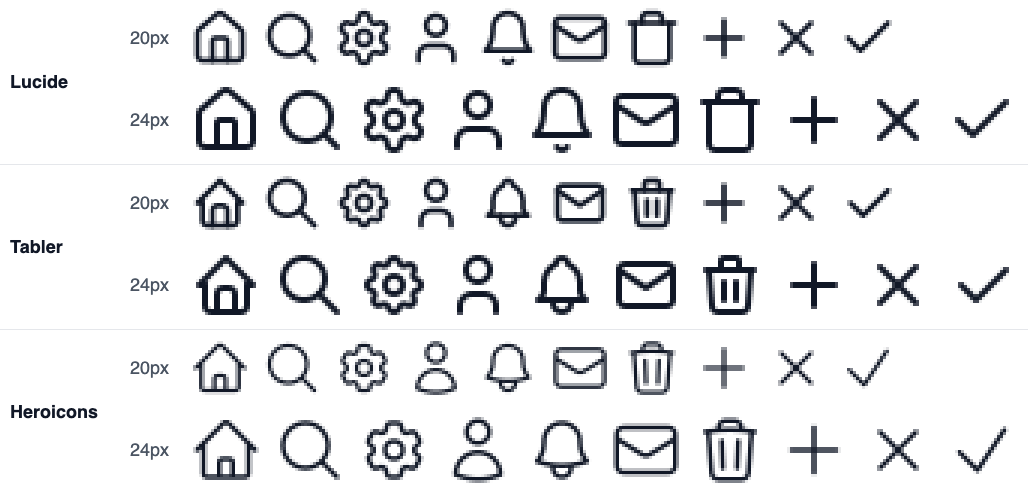
#111827, each library at its native stroke (Lucide 2, Tabler 2, Heroicons outline 1.5), shown 3× with nearest-neighbor scaling.Stroke control and variants
All three can be recolored with CSS color, because they all paint with currentColor. Stroke width is where they differ.
- Lucide takes
strokeWidth(default 2) and anabsoluteStrokeWidthflag that keeps lines the same pixel width at every icon size. The stroke width guide shows what that does at each size. - Tabler calls the prop
strokerather thanstrokeWidth(default 2). Filled icons are separate components with aFilledsuffix, such asIconHomeFilled. Only 1,001 of the 4,985 outline icons have one, so check before you design an active/inactive toggle around filled states. - Heroicons has no stroke prop. The outline set is drawn for 1.5, and because extra props are passed through to the
<svg>,strokeWidth={2}does work, but the icons were not designed for it. The solid, mini, and micro sets are filled shapes, so stroke width does nothing there.
Heroicons makes up for this with its size variants. The 20px and 16px sets are redrawn, not scaled down. The 16px home icon uses different paths than the 24px one, with fewer details, and at small sizes that beats shrinking a 24px drawing.
Using them in React
The component APIs differ enough that swapping libraries later is a find-and-replace job with some manual fixes:
import { House } from 'lucide-react';
import { IconHome, IconHomeFilled } from '@tabler/icons-react';
import { HomeIcon } from '@heroicons/react/24/outline';
import { HomeIcon as HomeSolid } from '@heroicons/react/24/solid';

export function Nav() {
  return (
    <>
      {/* Lucide: size, color, strokeWidth, absoluteStrokeWidth */}
      <House size={20} strokeWidth={1.75} aria-hidden="true" />

      {/* Tabler: size, color, stroke (not strokeWidth), title */}
      <IconHome size={20} stroke={1.75} aria-hidden="true" />
      <IconHomeFilled size={20} />

      {/* Heroicons: no size prop. Size it with CSS (Tailwind shown) */}
      <HomeIcon className="size-5" />
      <HomeSolid className="size-5 text-indigo-600" />
    </>
  );
}
Naming is the other snag. Lucide calls it house, Tabler calls it home; Lucide has settings, Heroicons has Cog6ToothIcon; Heroicons uses MagnifyingGlassIcon where the others say search. Before you commit, list the 20–30 icons your product actually needs and look each one up in each set.
Bundle cost: measured, and mostly a non-issue
All three packages set "sideEffects": false and ship ES modules, so a bundler includes only the icons you import. To see what that costs, I bundled a file that imports one icon, then another that imports ten common ones (home, search, settings, user, bell, mail, trash, plus, x, check), using esbuild 0.21.5 with minification and React marked external. Gzip sizes are level 9:
// one-icon.jsx
import { House } from 'lucide-react';
export default House;

# bundle it the way a production build would, React left external
npx esbuild one-icon.jsx --bundle --minify --format=esm \
  --external:react --external:react/jsx-runtime --outfile=out.js
wc -c < out.js && gzip -9 < out.js | wc -c- 1 icon: Lucide 2,515 B (878 B gzipped), Tabler 2,016 B (744 B), Heroicons 690 B (445 B).
- 10 icons: Lucide 6,192 B (1,568 B gzipped), Tabler 6,185 B (1,418 B), Heroicons 6,828 B (1,758 B).
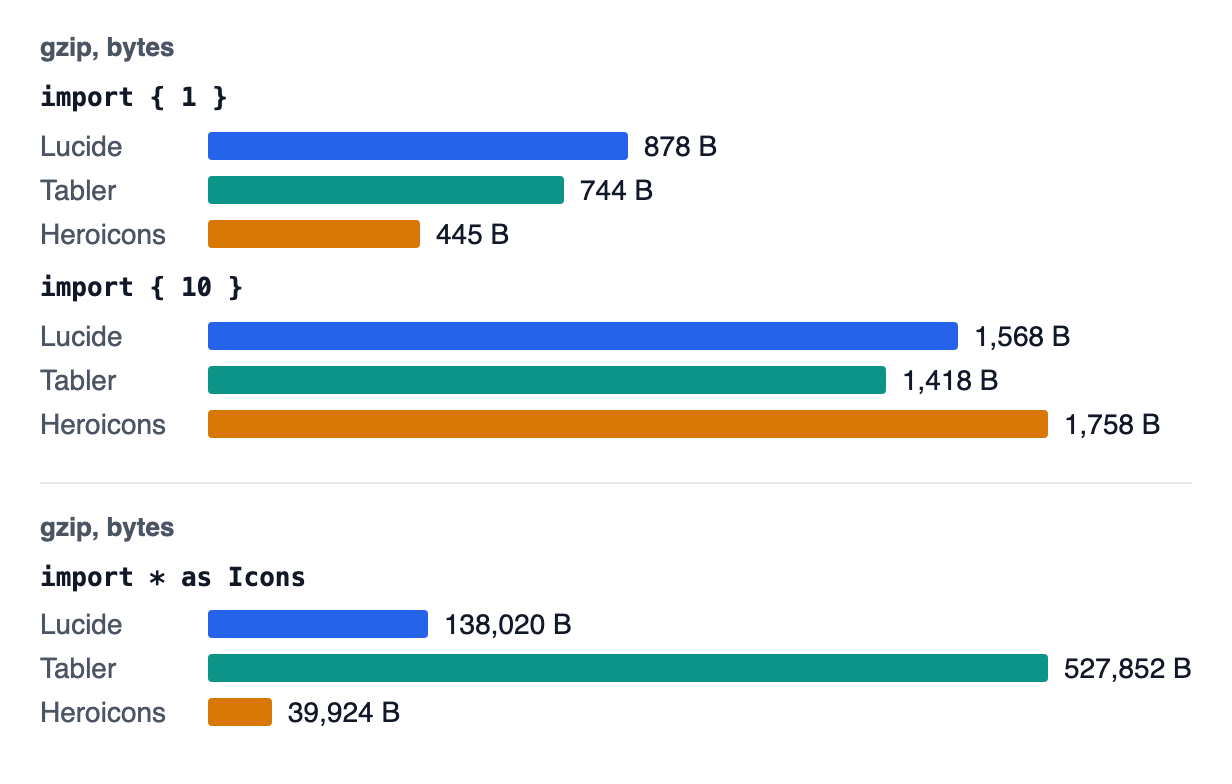
import * as Icons on its own scale below.Lucide and Tabler pay a small, one-time cost for a shared factory function that every icon uses; Heroicons compiles each icon as a standalone component. By ten icons, all three land within 340 bytes of each other gzipped. Bundle size won’t help you choose.
The mistake that does cost you: importing everything
Tree-shaking only works when the bundler can see which names you use. A common pattern for CMS- or database-driven icons, import * as Icons followed by Icons[name], defeats it.
Built the same way as above, that pattern produced 889,675 B (138,020 B gzipped) for Lucide, 232,329 B (39,924 B) for Heroicons outline, and 4,091,519 B (527,852 B) for Tabler (outline and filled together). Use an explicit map instead:
// Pulls in the entire library: the bundler cannot know which names you use
import * as Icons from 'lucide-react';
export const Icon = ({ name, ...props }) => {
  const Cmp = Icons[name];
  return <Cmp {...props} />;
};

// Keeps the bundle small: an explicit map of the icons your data can reference
import { House, Search, Settings } from 'lucide-react';
const ICONS = { house: House, search: Search, settings: Settings };
export const Icon = ({ name, ...props }) => {
  const Cmp = ICONS[name];
  return Cmp ? <Cmp {...props} /> : null;
};
If you really do need any icon by name at runtime (an icon picker, for example), load them lazily. Lucide ships a dynamicIconImports map for this, which puts each icon in its own chunk instead of the main bundle.
Accessibility defaults differ
Most icons next to text are decorative and should be hidden from screen readers with aria-hidden="true". The three libraries handle this differently:
- Heroicons adds
aria-hidden="true"to every icon by default, which is right for decorative use, and keeps it even when you pass atitleprop. The accessible icons guide shows what a screen reader gets in that case and how to label the button instead. - Lucide 0.460 adds no ARIA attributes. Add
aria-hidden="true"yourself on decorative icons, or screen readers may run into an unlabeled graphic. - Tabler adds no ARIA attributes either, but accepts a
titleprop that renders a<title>element inside the SVG.
Four traps when picking a set
- Mixing stroke weights. Lucide or Tabler at 2 next to Heroicons at 1.5 reads as inconsistent. If you mix sets, set Lucide’s
strokeWidthor Tabler’sstroketo 1.5 to match, or the other way around. - Assuming a filled version exists. Every Heroicons icon has a solid twin; only about one in five Tabler outline icons does (1,001 of 4,985); Lucide has none.
- Choosing on total count alone. Heroicons has around a fifth as many icons as Lucide, but if its 324 cover your navigation and actions, the smaller set is easier to browse and more consistent.
- Building on deprecated brand icons. Lucide’s logos still work today but are marked for removal.
All three are free for commercial use: Lucide is ISC, the other two MIT, and both licenses only ask that the license notice stay with copies of the code, which installing the npm package takes care of. Using two together is common too, usually one main set plus Tabler for logos or niche icons, as long as you match stroke width and size.
How to decide in ten minutes
- List the icons your product needs today, including the awkward ones (file types, payment methods, logos).
- Look each one up in all three sets and count the misses.
- Put your five most-used icons from each set in a real toolbar at the size you ship, not on a white preview grid.
- Pick the set with the fewest misses whose weight matches your typography, and fill any gaps from a second set with the stroke matched.
For step 3, Icony has all three libraries (plus Phosphor, Bootstrap Icons, and Radix) in one searchable page, so you can compare the same icon across sets at the same size and stroke before installing anything.