Paste an SVG from a design tool into a .tsx file and you find out quickly that JSX is not HTML. React warns about class and stroke-width, the compiler rejects xlink:href, and a style="…" string throws at render time.
None of this is hard to fix, but the fixes are only half the job. The other half is giving the icon a props API that still makes sense after it has been used in forty places.
This guide walks through the conversion by hand, then shows when to hand the job to SVGR. The markup in the examples is copied from real packages installed via npm (@tabler/icons 3.36.1 and lucide-react 0.460.0), not simplified stand-ins, so the quirks you see are the quirks you will actually meet. Measured on lucide-react 0.460.0, the version Icony ships; newer releases add icons but keep the same drawing rules.
Start from real markup
This is Tabler’s star icon exactly as it ships in node_modules/@tabler/icons/icons/outline/star.svg:
<svg
  xmlns="http://www.w3.org/2000/svg"
  width="24"
  height="24"
  viewBox="0 0 24 24"
  fill="none"
  stroke="currentColor"
  stroke-width="2"
  stroke-linecap="round"
  stroke-linejoin="round"
  class="icon icon-tabler icons-tabler-outline icon-tabler-star"
>
  <path stroke="none" d="M0 0h24v24H0z" fill="none"/>
  <path d="M12 17.75l-6.172 3.245l1.179 -6.873l-5 -4.867l6.9 -1l3.086 -6.253l3.086 6.253l6.9 1l-5 4.867l1.179 6.873l-6.158 -3.245" />
</svg>
Before it can live in JSX, you need to fix the hyphenated presentation attributes, the class attribute, and that first <path>.
The first path is Tabler’s invisible 24×24 bounding box: it has stroke="none" and fill="none", so it draws nothing. You can delete it. If you keep it, read “Bugs that show up later” below first, because CSS can make it visible again.
Step 1: convert the attributes
React expects camelCase names for SVG attributes that contain a hyphen. These are the ones that show up in icon files in practice:
stroke-width,stroke-linecap,stroke-linejoin→strokeWidth,strokeLinecap,strokeLinejoinstroke-dasharray,stroke-dashoffset,stroke-miterlimit→strokeDasharray,strokeDashoffset,strokeMiterlimitfill-rule,clip-rule,clip-path→fillRule,clipRule,clipPathstop-color,stop-opacity(inside gradients) →stopColor,stopOpacityclass→classNamexlink:href→ plainhref, and dropxmlns:xlink. SVG 2 made thexlinknamespace unnecessary, and namespaced attribute names are a compile error in JSX.style="opacity:.5;fill:red"→style={{ opacity: 0.5, fill: 'red' }}. A string throws: “Thestyleprop expects a mapping from style properties to values, not a string.”
Some things stay exactly as they are. viewBox is already camelCase in SVG, geometry attributes like d, cx, r and points have no hyphen, and data-* and aria-* attributes stay hyphenated in JSX.
xmlns is harmless inline. Keep it if the same markup might also be saved as a standalone .svg file, where it is required.
If you miss one, React tells you in the dev console with a message like “Invalid DOM property stroke-width. Did you mean strokeWidth?” The icon usually still renders, so these warnings are easy to ignore until someone turns on a strict lint rule.
Step 2: wrap it in a component with a real props API
A component that only renders fixed markup is barely better than pasting the SVG. The useful version lets callers change size and color, add a class, and decide whether the icon is decorative or meaningful:
import * as React from 'react';

type IconProps = React.ComponentPropsWithoutRef<'svg'> & {
  size?: number | string;
  title?: string;
};

export function StarIcon({ size = 24, title, ...props }: IconProps) {
  return (
    <svg
      xmlns="http://www.w3.org/2000/svg"
      width={size}
      height={size}
      viewBox="0 0 24 24"
      fill="none"
      stroke="currentColor"
      strokeWidth={2}
      strokeLinecap="round"
      strokeLinejoin="round"
      aria-hidden={title ? undefined : true}
      role={title ? 'img' : undefined}
      {...props}
    >
      {title ? <title>{title}</title> : null}
      <path d="M12 17.75l-6.172 3.245l1.179 -6.873l-5 -4.867l6.9 -1l3.086 -6.253l3.086 6.253l6.9 1l-5 4.867l1.179 6.873l-6.158 -3.245" />
    </svg>
  );
}

// Usage
<StarIcon className="text-amber-500" />            // decorative, inherits color
<StarIcon size={32} title="Favorited" />            // meaningful, announced
<StarIcon strokeWidth={1.5} stroke="#2563eb" />     // props override defaults
Why each part is there:
stroke="currentColor", not a hex value. The icon takes the CSScolorof its parent, soclassName="text-amber-500"or acoloron the button just works, including in dark mode.- Defaults before
{...props}. Spreading last means a caller’sstrokeWidthorstrokewins. If you spread first, your hard-coded defaults silently overwrite what the caller passed, which is the most common “my prop does nothing” bug. sizesetswidthandheight, never theviewBox. The viewBox describes the coordinate system of the path data. Change it and the drawing shifts or crops instead of scaling.aria-hiddenby default,role="img"with a<title>on request. Most icons sit next to text that already says what they mean. The ones that stand alone need a name. Accessible SVG icons has the full pattern.React.ComponentPropsWithoutRef<'svg'>instead ofReact.SVGProps<SVGSVGElement>.SVGPropscarries areftyped as a legacy ref (string refs included), which tends to cause type errors once you addforwardRef.
Forwarding refs
Tooltip libraries, animation code and focus management sometimes need the actual <svg> DOM node. In React 18 a function component cannot receive a ref unless it is wrapped in forwardRef. In React 19, ref is a regular prop:
// React 18: forwardRef is required to expose the <svg> DOM node
export const StarIcon = React.forwardRef<SVGSVGElement, IconProps>(
  function StarIcon({ size = 24, ...props }, ref) {
    return (
      <svg ref={ref} width={size} height={size} viewBox="0 0 24 24" {...props}>
        {/* paths */}
      </svg>
    );
  }
);

// React 19: ref is an ordinary prop, so the plain function works as-is
// function StarIcon({ size = 24, ref, ...props }: IconProps & { ref?: React.Ref<SVGSVGElement> })
One component per icon, or one generic <Icon name>?
Once you have more than a handful of icons, you have to decide how to organize them. Mostly, that is a question of bundle size.
- One module per icon is what Lucide, Tabler and Heroicons ship. Bundlers can drop every icon you do not import. In
lucide-react0.460.0, the star icon module (dist/esm/icons/star.js) is 765 bytes on disk, 453 bytes gzipped. The shared runtime it depends on (createLucideIcon.js,Icon.js,defaultAttributes.js) adds about 2.3 KB raw, paid once no matter how many icons you import. (File sizes on disk; gzip at level 9 with Node’s zlib, each file on its own.) - A single
<Icon name="star" />backed by a lookup object is convenient, but the object references every icon, so every icon ends up in the bundle. That is fine for 15 icons and a real cost for 500.
If you are building your own set of 30 or more icons, copy Lucide’s approach. It stores each icon as data (an array of [tag, attributes] pairs) and renders all of them through one factory, so every icon file stays tiny and still tree-shakes:
type IconNode = [tag: string, attrs: Record<string, string>][];

export function createIcon(displayName: string, nodes: IconNode) {
  function Icon({ size = 24, ...props }: IconProps) {
    return (
      <svg width={size} height={size} viewBox="0 0 24 24" fill="none"
           stroke="currentColor" strokeWidth={2} strokeLinecap="round"
           strokeLinejoin="round" aria-hidden="true" {...props}>
        {nodes.map(([tag, attrs], i) => React.createElement(tag, { key: i, ...attrs }))}
      </svg>
    );
  }
  Icon.displayName = displayName;
  return Icon;
}

// One small module per icon keeps everything tree-shakeable
export const StarIcon = createIcon('StarIcon', [
  ['path', { d: 'M12 17.75l-6.172 3.245l1.179 -6.873l-5 -4.867l6.9 -1l3.086 -6.253l3.086 6.253l6.9 1l-5 4.867l1.179 6.873l-6.158 -3.245' }],
]);
The attribute objects passed to createElement must already use React’s camelCase names (strokeWidth, not stroke-width), because they skip the JSX compiler.
Step 3: automate it with SVGR
Hand-converting stops making sense when designers keep sending new .svg files. SVGR turns SVG files into React components, either at build time or once from the command line. With Vite, vite-plugin-svgr (v4 and later) exposes components through a ?react import suffix:
// vite.config.ts
import { defineConfig } from 'vite';
import react from '@vitejs/plugin-react';
import svgr from 'vite-plugin-svgr';

export default defineConfig({
  plugins: [
    react(),
    svgr({
      svgrOptions: {
        icon: true,                                   // width/height = "1em"
        replaceAttrValues: { '#000': 'currentColor' },
      },
    }),
  ],
});

// src/vite-env.d.ts
/// <reference types="vite-plugin-svgr/client" />

// Anywhere in the app
import StarIcon from './icons/star.svg?react';
icon: true replaces the fixed width and height with 1em, so the icon scales with font size. replaceAttrValues swaps a hard-coded color for currentColor during conversion. Match the value your design tool actually exports (#000, #000000, #1E1E1E…), since the replacement is an exact string match.
Next.js 16 builds with Turbopack by default, so register SVGR as a Turbopack loader rule. This is the configuration from the Next.js docs:
// next.config.js — Next.js 16 builds with Turbopack by default
module.exports = {
  turbopack: {
    rules: {
      '*.svg': { loaders: ['@svgr/webpack'], as: '*.js' },
    },
  },
};
A third option skips build configuration entirely. Run the SVGR CLI over a folder and commit the generated .tsx files. You get ordinary components that show up in code review and diff cleanly when an icon changes:
# Convert a folder once and commit the output
npx @svgr/cli --typescript --icon \
  --replace-attr-values "#000=currentColor" \
  --out-dir src/icons -- assets/icons
Which should you pick? Use the build plugin when icons change often and nobody edits the output by hand. Use the CLI when you want to tweak individual components afterwards (for example to add a second color or an animation), or when you do not control the bundler config.
Bugs that show up later
- Duplicate IDs. Files exported from Figma or Illustrator often contain
<linearGradient id="a">or<clipPath id="b">. Render two such icons on one page and bothurl(#a)references resolve to the first definition, so the second icon shows the first one’s colors. If that first icon is inside adisplay: nonecontainer, the visible copy loses its fill entirely. Give each instance a unique ID (see below), or let SVGO’sprefixIdsplugin rewrite them at build time. - CSS resurrecting invisible paths. A broad rule like
.icon path { stroke: currentColor }overridesstroke="none"and draws Tabler’s invisible bounding-box path as a square; delete that path when you convert (screenshots of the trap). - Overriding attributes that live on child elements. Lucide puts
stroke-linecapandstroke-linejoinon the root<svg>. Heroicons 2.2 puts them on the<path>itself. AstrokeLinecapprop passed to the root of a Heroicons-style component changes nothing, because an attribute set on a child beats one it would inherit. - Keeping
fill="none"when switching to a filled style. The paths inherit it. Setfill="currentColor"on the root, or on the path. - Resizing by editing
viewBox. Changewidthandheight(orfont-sizewhen the size is1em), and leave the viewBox alone.
Here is the duplicate-ID case in headless Chromium. Each row is its own page with two 64px gradient circles: the first indigo to pink, the second green to yellow.
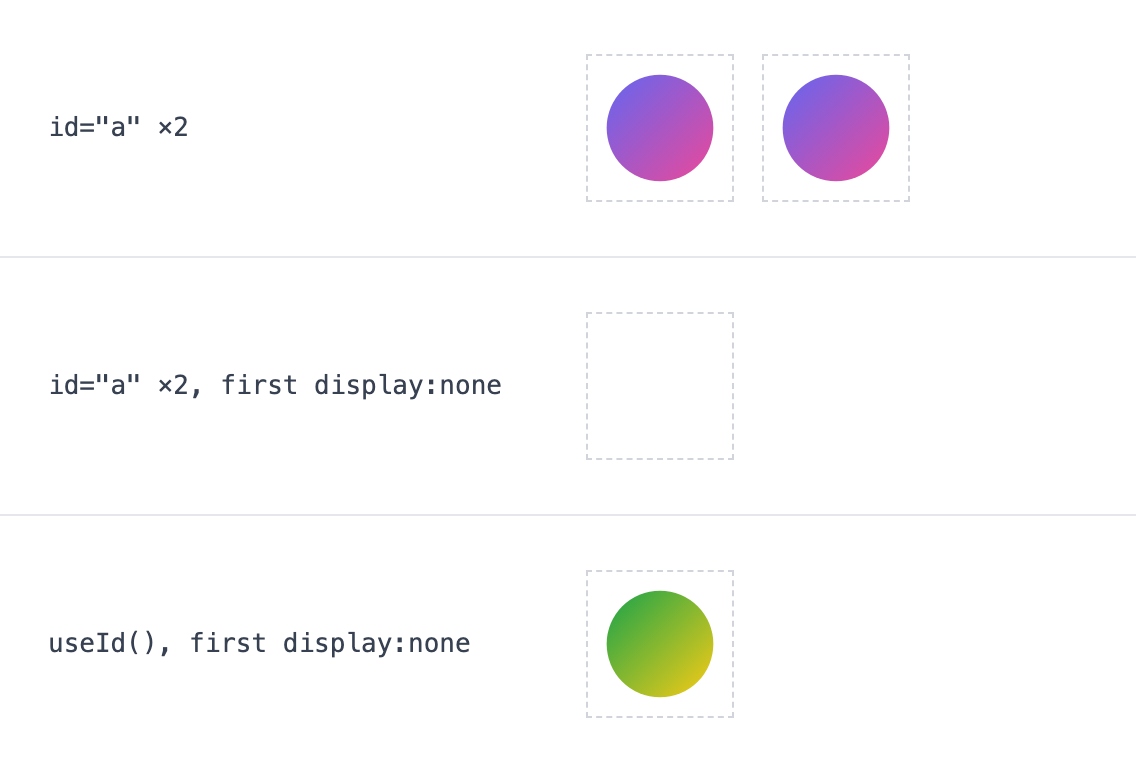
id="a", and the green one renders the first gradient. Middle: same, with the first icon in a display: none container; the visible icon is empty. Bottom: ids from React.useId(), first icon still hidden. React 18.3.1, deviceScaleFactor 2.For per-instance gradient IDs, useId() (React 18 and later) is the simplest fix:
function GradientBadge(props: React.ComponentPropsWithoutRef<'svg'>) {
  // React 18 ids look like ":R0:" — strip the colons so the id is also
  // safe to use in a CSS selector.
  const id = React.useId().replace(/:/g, '');
  return (
    <svg viewBox="0 0 24 24" width={24} height={24} {...props}>
      <defs>
        <linearGradient id={`${id}-g`} x1="0" y1="0" x2="1" y2="1">
          <stop offset="0" stopColor="#6366f1" />
          <stop offset="1" stopColor="#ec4899" />
        </linearGradient>
      </defs>
      <circle cx="12" cy="12" r="10" fill={`url(#${id}-g)`} />
    </svg>
  );
}
What Icony’s “Copy JSX” produces
Icony’s own converter is a useful reference for how little a single-icon conversion needs. It renders the icon you picked with react-dom/server (your color, size and stroke already applied), then src/utils/svgCode.ts renames class to className, camelCases every word-word= attribute except data- and aria-, and inserts {...props} after the baked-in attributes. This is the complete output for Lucide’s star in #2563eb at 24px:
import * as React from 'react';

export function StarIcon(props: React.SVGProps<SVGSVGElement>) {
  return (
    <svg xmlns="http://www.w3.org/2000/svg" width="24" height="24" viewBox="0 0 24 24" fill="none" stroke="#2563eb" strokeWidth="2" strokeLinecap="round" strokeLinejoin="round" className="lucide lucide-star" {...props}>
        <path d="M11.525 2.295a.53.53 0 0 1 .95 0l2.31 4.679a2.123 2.123 0 0 0 1.595 1.16l5.166.756a.53.53 0 0 1 .294.904l-3.736 3.638a2.123 2.123 0 0 0-.611 1.878l.882 5.14a.53.53 0 0 1-.771.56l-4.618-2.428a2.122 2.122 0 0 0-1.973 0L6.396 21.01a.53.53 0 0 1-.77-.56l.881-5.139a2.122 2.122 0 0 0-.611-1.879L2.16 9.795a.53.53 0 0 1 .294-.906l5.165-.755a2.122 2.122 0 0 0 1.597-1.16z">
        </path>
      </svg>
  );
}
The color is baked in as stroke="#2563eb". Because props are spread last, you can still pass stroke="currentColor" at the call site to make it theme-aware, or edit that one attribute in the pasted code.
Quick answers
- Should I just use
<img src="/star.svg">in React? For single-color UI icons, usually not: an<img>cannot usecurrentColor, so hover states and dark mode need separate files. It is a fine choice for detailed, multi-color illustrations that never change color. - Does inlining every icon hurt performance? Each inline icon is part of your JavaScript and your DOM. For a few dozen icons that cost is negligible. If the same icons repeat hundreds of times per page, compare with an SVG sprite.
- Why does the stroke look thicker at 48px?
strokeWidthis in viewBox units, so it grows with the icon. SVG stroke width measures this and covers the fixes.
By hand or automated?
For one or two icons, do it by hand. For a growing set, use per-icon modules through SVGR or a small factory so unused icons never reach the bundle.