How much an SVG can shrink depends almost entirely on where it came from. A file saved from a design tool is often mostly metadata, and optimizing it can remove the large majority of its bytes.
An icon from a well-maintained open-source library is already lean, and the same optimizer saves a few percent. Knowing which case you are in tells you how much effort is worth spending.
Every number in this article comes from running SVGO 4.1.0 (the standard Node.js SVG optimizer) through its Node API on real files. Raw sizes are bytes; compressed sizes are gzip level 9, the same as gzip -9 < file | wc -c.
The tool: SVGO
SVGO runs a pipeline of plugins over the SVG’s XML: it removes comments and editor data, rounds numbers, rewrites path data in a shorter form, merges paths, and collapses useless groups. You can run it without installing anything:
# optimize one file into a new file (keeps the original)
npx svgo icon.svg -o icon.min.svg

# optimize every SVG in a folder into another folder
npx svgo -f ./icons -o ./icons-min

# compare sizes before and after, raw and gzipped
wc -c icon.svg icon.min.svg
gzip -9 < icon.svg | wc -c; gzip -9 < icon.min.svg | wc -c
Without -o, SVGO overwrites the input file. Keep your source files under version control, or always write to a separate output folder, so you can go back if an optimization breaks something.
Case 1: an editor export (big savings)
To test a typical design-tool file, I built a 24×24 house icon with the structure Inkscape writes: an XML declaration, a generator comment, sodipodi and inkscape namespaces, a namedview block with window and zoom settings, RDF metadata, an unused gradient, a hidden sketch layer, an empty group, and paths with six-decimal coordinates and inline style attributes. An excerpt:
<?xml version="1.0" encoding="UTF-8" standalone="no"?>
<!-- Created with Inkscape (http://www.inkscape.org/) -->
<svg width="24mm" height="24mm" viewBox="0 0 24 24" version="1.1" id="svg5"
   inkscape:version="1.3 (0e150ed6c4, 2023-07-21)" sodipodi:docname="home.svg" …>
  <sodipodi:namedview id="namedview7" pagecolor="#ffffff" inkscape:zoom="22.627417" … />
  <defs id="defs2"><linearGradient id="linearGradient1" …>…</linearGradient></defs>
  <metadata id="metadata1"><rdf:RDF>…</rdf:RDF></metadata>
  <g inkscape:label="Sketch" id="layer2" style="display:none">…</g>
  <g inkscape:label="Layer 1" id="layer1">
    <g id="g1" />
    <path style="fill:none;stroke:#000000;stroke-width:2.000000;…"
       d="M 5.000000,12.000000 H 3.000000 L 12.000000,3.000000 21.000000,12.000000 H 19.000000"
       id="path1" sodipodi:nodetypes="ccccc" />
    …two more paths in the same style…
  </g>
</svg>
The file was 3,811 bytes (1,207 gzipped). After SVGO with default settings it was 470 bytes (233 gzipped): 88% smaller raw and 81% smaller gzipped, with no visible change. This is the output:
<svg xmlns="http://www.w3.org/2000/svg" width="24mm" height="24mm" viewBox="0 0 24 24">
  <path d="M5 12H3l9-9 9 9h-2M5 12v7a2 2 0 0 0 2 2h10a2 2 0 0 0 2-2v-7"
        style="fill:none;stroke:#000;stroke-width:2;stroke-linecap:round;stroke-linejoin:round;stroke-dasharray:none;stroke-opacity:1"/>
  <path d="M9 21v-6a2 2 0 0 1 2-2h2a2 2 0 0 1 2 2v6" style="…same…"/>
</svg>
SVGO removed the metadata, hidden layer, empty group, unused gradient, and namespaces; shortened M 5.000000,12.000000 to M5 12; converted absolute coordinates, arcs included, to shorter relative ones; and merged two of the three paths. But look at what it left:
width="24mm": physical units from the editor document. Used as-is, the icon renders at about 91 CSS pixels (24mm at 96px per inch).stroke:#000: a hard-coded black. The icon won’t follow CSScolor, so it can’t switch to a dark-mode or hover color.- Inline
styleattributes, repeated on every path.
None of these are bugs; the default preset avoids changes that could alter how a file behaves. For icons, you usually want those changes. This config makes them:
// svgo.config.mjs: SVGO picks this up automatically from the current folder
export default {
  multipass: true,
  floatPrecision: 2,
  plugins: [
    'preset-default',
    'convertStyleToAttrs',   // style="fill:none;…" -> fill="none" …
    'removeDimensions',      // drop width/height, keep viewBox
    {
      name: 'convertColors',
      params: { currentColor: true }, // #000 -> currentColor, so CSS can recolor it
    },
  ],
};
With it, the same file came out at 385 bytes (201 gzipped), recolorable, and sized by CSS:
<svg xmlns="http://www.w3.org/2000/svg" viewBox="0 0 24 24">
  <path fill="none" stroke="currentColor" stroke-linecap="round" stroke-linejoin="round" stroke-width="2"
        d="M5 12H3l9-9 9 9h-2M5 12v7a2 2 0 0 0 2 2h10a2 2 0 0 0 2-2v-7"/>
  <path fill="none" stroke="currentColor" stroke-linecap="round" stroke-linejoin="round" stroke-width="2"
        d="M9 21v-6a2 2 0 0 1 2-2h2a2 2 0 0 1 2 2v6"/>
</svg>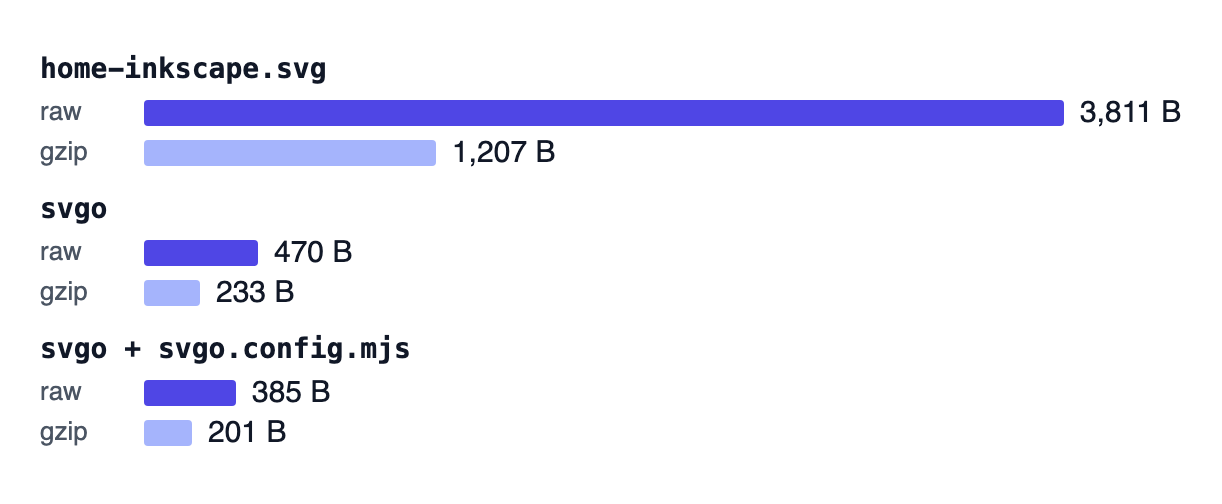
Case 2: an icon library (small savings)
Library icons are a different story. Tabler’s home.svg from @tabler/icons 3.36.1 is 481 bytes (272 gzipped).
SVGO defaults brought it to 412 bytes (257 gzipped): 14% raw, 6% gzipped. Most of what it saved was whitespace and path syntax (l-2 0 becomes H3).
Two things SVGO does not remove, because it can’t know they are unneeded: the class list (class="icon icon-tabler icons-tabler-outline icon-tabler-home", 63 bytes with its leading space) and an invisible bounding-box path (M0 0h24v24H0z), which Tabler adds to every outline icon and which can also break recoloring. Removing both from SVGO’s output by hand brought the file to 310 bytes (209 gzipped), 36% smaller than the original. That is only safe if nothing in your CSS relies on those classes.
Across the whole set, SVGO reduced Tabler’s 4,985 outline files from 2,778,058 to 2,274,008 bytes, an 18% cut. Concatenated and gzipped, the totals were 239,297 and 214,759 bytes, a 10% difference. Useful if you serve thousands of icons as individual files, but not dramatic.
The SVG that icon components render is leaner still. I exported three 24px “home” icons the way Icony produces its SVG downloads (each at its native stroke), then ran SVGO on each: Lucide went from 397 to 382 bytes, Tabler from 381 to 339, and Heroicons from 493 to 482. After gzip, the savings were 3 to 5 bytes per file.
Case 3: how much does precision matter?
Coordinate precision is the setting people push hardest, so I tested it on Radix’s home icon, whose path data has up to six digits per number (M7.07926 0.222253C7.31275 -0.007434 …). The markup the React component renders is 808 bytes (436 gzipped). With -p (the floatPrecision option):
- Default (3 decimals): 403 bytes, 271 gzipped.
- 2 decimals: 391 bytes, 267 gzipped.
- 1 decimal: 345 bytes, 262 gzipped.
Going from three decimals to one saved 58 raw bytes but only 9 after gzip. It also changed the drawing: points like 5.918 and 6.902 snapped to 5.9 and 7, and SVGO replaced several arcs with quadratic curves.
To see what that does on screen, I rasterized each version at the icon’s native 15px and compared it pixel by pixel with the source. At 3 decimals, 3 pixels changed, by at most 12 of 255 alpha levels. At 2 decimals, 23 pixels changed, by at most 10. At 1 decimal, 52 pixels changed, by up to 62, and the floor line shifted enough to leave a faint gray row under it.
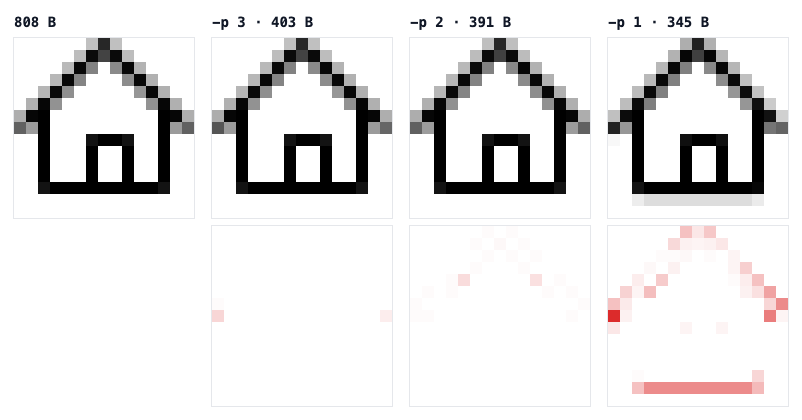
HomeIcon (@radix-ui/react-icons 1.3.2) rasterized at 15px with librsvg and shown 12×. Bottom row: per-pixel alpha difference from the source, drawn in red at 4× strength.For 24-unit icons, 2 or 3 decimal places is the practical floor. Below that, the savings mostly disappear after compression and the risk of visible distortion goes up. For large illustrations with big coordinates, you have more room. SVGOMG, a web interface for SVGO, previews the result live while you change precision.
Compression does most of the work
SVG is text, and text compresses well. The house file above went from 3,811 to 1,207 bytes with gzip alone, before any optimization.
Make sure your server or CDN sends SVG files with gzip or Brotli compression (most hosting platforms do this by default for image/svg+xml; check the content-encoding response header in your browser’s network panel). Inline SVG in HTML is compressed along with the page.
Optimization and compression stack: SVGO removes content that compression can only shrink, then gzip handles the repetition that remains. For editor exports, do both. For library icons, compression alone gets you most of the benefit.
What not to strip
SVGO 4 is more careful than older versions: removeViewBox and removeTitle are no longer in the default preset (I checked the plugin list in the installed package). A few defaults can still break real code:
cleanupIdsremoves ids that aren’t referenced within the file and shortens the ones that are. If your CSS targets#arrow-shaft, your JavaScript callsgetElementById, or another document uses<use href="sprite.svg#icon-home">, those references break.mergePathscombines paths with the same attributes. Harmless for static icons, but a problem if you animate or style paths individually.removeDescdeletes<desc>elements, which some teams use for accessible descriptions.removeDimensions(not in the default preset, but in my config above) is right for icons sized by CSS and wrong for a standalone image that needs a default size.
Here is what cleanupIds does, and how to turn it off:
<!-- input -->
<svg viewBox="0 0 24 24"><path id="arrow-shaft" d="M4 12h16"/><path id="unused" d="M1 1h1"/></svg>

<!-- SVGO defaults: ids removed, and the two paths merged into one -->
<svg viewBox="0 0 24 24"><path d="M4 12h16M1 1h1"/></svg>

<!-- with cleanupIds: false: ids and separate paths kept -->
<svg viewBox="0 0 24 24"><path id="arrow-shaft" d="M4 12h16"/><path id="unused" d="M1 1h1"/></svg>
// svgo.config.mjs: keep ids that CSS, JS, or <use href="#…"> depend on
export default {
plugins: [
{
name: 'preset-default',
params: {
overrides: {
cleanupIds: false,
},
},
},
],
};Manual cleanups SVGO can’t do for you
- Crop the artboard to the artwork before exporting, so the
viewBoxisn’t padded with empty space. - Outline text or remove it. Text elements depend on fonts that may not exist on the viewer’s machine.
- Delete hidden and guide layers in the editor. SVGO removes
display:nonecontent, but not layers that are merely parked outside the artboard. - Avoid embedded bitmaps. An SVG containing a base64 PNG is a PNG with extra overhead; export it as an image instead.
- Simplify paths that came from auto-tracing, which often produces hundreds of unnecessary nodes. Most editors have a “simplify path” command; use it carefully and compare.
- Use
currentColorfor single-color icons so you don’t need separate files per color.
Four ways optimization backfires
- Optimizing library icons and expecting big wins. You will save a few percent. Spend the effort on bundling instead: import only the icons you use.
- Running SVGO in place without version control. One bad config can overwrite a whole folder of source files.
- Setting precision to 0 or 1 on small icons. As measured above, gzip erases most of the savings, and the distortion is real.
- Forgetting
width/heightin physical units. Editor exports inmmorptrender at unexpected sizes. Remove them or replace them with pixel values.
What to do with your own files
Run SVGO on anything that came out of a design tool; you will often remove 80% or more, as the 3,811 → 470 byte example shows. If designers add SVGs to the repository regularly, a pre-commit hook or build step keeps editor metadata from creeping back in.
Add convertStyleToAttrs, currentColor, and dimension removal for icons you want to style with CSS. Leave precision at 2–3 decimals for small icons, keep ids that your code references, and serve SVG with compression. For icons from established libraries, the files are already close to minimal; focus on shipping fewer of them.