“The SVG isn’t showing” can mean three very different things: the file never loaded, it loaded but has no size, or it has a size but nothing visible is drawn inside it.
Each has its own causes, so start by working out which of the three you have. That takes a minute in DevTools and saves you from trying fixes at random.
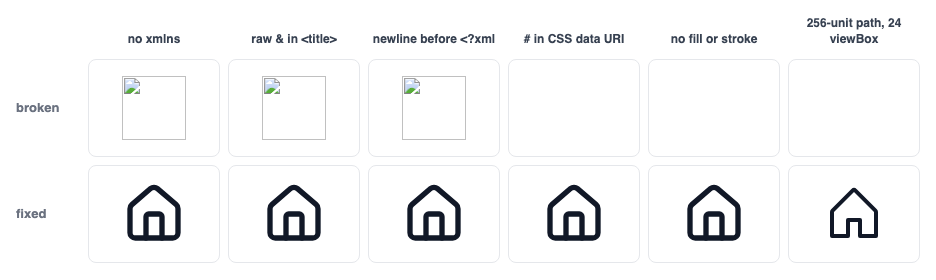
<img> from a data URI and fail to decode (naturalWidth 0). The fourth is a CSS background, the last two are inline SVG, and those three draw no pixels at all.First, a one-minute diagnosis
- Find the element in the Elements panel. If the
<svg>or<img>is not in the DOM at all, the problem is in your template or component, not the SVG. - Hover over it. DevTools highlights its box and shows the dimensions. A
0 × 0box, or no highlight at all, means a size problem. - For
<img>, CSS backgrounds and external sprites, check the Network tab. Look at the status code and the response’sContent-Type. A 404 or a non-SVG content type means a loading problem. - If it has a size and loaded fine, it is a drawing problem: no color, a color that matches the background, or artwork outside the
viewBox.
For inline SVG, this console snippet collects everything relevant in one table. Select the <svg> in the Elements panel first, so it is available as $0:
// Paste into the console with the <svg> selected in the Elements panel ($0)
const s = $0, cs = getComputedStyle(s), box = s.getBoundingClientRect();
console.table({
  size: `${box.width} × ${box.height}`,
  viewBox: s.getAttribute('viewBox'),
  color: cs.color,
  fill: cs.fill,
  stroke: cs.stroke,
  display: cs.display,
  visibility: cs.visibility,
  opacity: cs.opacity,
  drawingBounds: (() => { try { const b = s.getBBox(); return `${b.x},${b.y} ${b.width}×${b.height}`; } catch { return 'n/a'; } })(),
});
Compare drawingBounds (where the shapes actually are, from getBBox()) with the viewBox. Here is what the snippet returned in Chromium for the last broken case in the figure above:
// Run on a Phosphor path (256-unit grid) pasted into viewBox="0 0 24 24", shown at 64 × 64
size           64 × 64
viewBox        0 0 24 24
color          rgb(17, 24, 39)
fill           rgb(17, 24, 39)
stroke         none
display        block
visibility     visible
opacity        1
drawingBounds  31.99989891052246,23.997413635253906 192.00021362304688×200.00259399414062
Size, color, display and opacity all look normal. The giveaway is the last line: the shapes start at about 32,24 and run about 192 units across, while the viewBox only shows 0 to 24.
Loading problems
Wrong path. Start with the simple ones. A relative URL inside a CSS file is resolved against the CSS file’s location, not the page’s. In Next.js and Vite, files in public/ are served from the site root, so the URL is /icons/logo.svg, not /public/icons/logo.svg.
If it works on your Mac but returns 404 in production, check the capitalization: macOS file systems are case-insensitive by default, Linux servers are not, so Logo.svg and logo.svg are different files once deployed.
Wrong Content-Type. When an SVG is loaded as an image (<img>, background-image, <object>), the server must send Content-Type: image/svg+xml. With anything else, typically text/plain or application/octet-stream, the browser does not render it. Check what the server actually sends:
curl -sI https://example.com/icons/logo.svg | grep -i -E '^(HTTP|content-type|content-encoding)'

# Good
HTTP/2 200
content-type: image/svg+xml

# Broken: <img> will show nothing
content-type: application/octet-stream
The fix belongs in the server or storage configuration. Default nginx and Apache setups map .svg correctly, so the usual suspects are custom configs, object storage uploads that didn’t set the metadata, and application servers that stream files themselves:
# nginx — mime.types normally already has this line; check custom configs
types { image/svg+xml svg svgz; }

# Apache (.htaccess)
AddType image/svg+xml .svg .svgz
AddEncoding gzip .svgz          # .svgz is gzipped and needs Content-Encoding: gzip

# S3 / object storage: set the metadata explicitly when uploading
aws s3 cp logo.svg s3://my-bucket/icons/ --content-type image/svg+xml
Missing xmlns. Inline SVG inside HTML does not need a namespace declaration, because the HTML parser knows what <svg> is. A standalone .svg file is parsed as XML, and without xmlns="http://www.w3.org/2000/svg" it is just an unknown XML element, which renders nothing. This is the classic “works when pasted inline, blank as <img>” bug, and it usually comes from copying markup out of a page’s DOM into a file:
<!-- Works inline in HTML, but shows nothing as <img src="logo.svg"> -->
<svg viewBox="0 0 24 24"><path d="M5 12h14" stroke="black" /></svg>

<!-- Standalone .svg files must declare the SVG namespace -->
<svg xmlns="http://www.w3.org/2000/svg" viewBox="0 0 24 24"><path d="M5 12h14" stroke="black" /></svg>
Invalid XML. The HTML parser forgives almost anything in inline SVG. The XML parser used for standalone files forgives nothing, so one bad character blanks the whole image.
Open the SVG URL directly in the browser, where an XML error page names the line and column, or run xmllint (preinstalled on macOS and most Linux distributions). These are its real messages for the three most common mistakes:
$ xmllint --noout logo.svg

# A blank line before the XML declaration
logo.svg:2: parser error : XML declaration allowed only at the start of the document

# A raw ampersand: <title>Terms & Conditions</title>
logo.svg:1: parser error : xmlParseEntityRef: no name

# An unclosed <path> tag
logo.svg:1: parser error : Opening and ending tag mismatch: path line 1 and svg
The first usually comes from a template or a PHP file that outputs a newline before <?xml. The second comes from text such as <title> or <desc> containing a raw &, which must be written as &. The third comes from hand editing.
A framework import that returns the wrong thing. Bundlers turn import x from './x.svg' into different values depending on configuration, and using the wrong kind of value fails quietly:
// Next.js (no SVGR configured): a static import is an object, not a URL
import logo from './logo.svg';

<img src={logo} alt="Acme" />            // ✗ renders src="[object Object]"
<img src={logo.src} alt="Acme" />        // ✓
<Image src={logo} alt="Acme" />          // ✓ next/image accepts the object

// Vite + vite-plugin-svgr: the suffix decides what you get
import logoUrl from './logo.svg';        // a URL string, for <img src>
import Logo from './logo.svg?react';     // a React component, for <Logo />
In Next.js, the object comes from the built-in static image import, which handles .svg alongside PNG and JPEG. The *.svg module is typed as any so that it does not conflict with SVGR, which means TypeScript will not warn you about src={logo}.
Note also that next/image skips optimization for sources ending in .svg. That is intended, not a failure.
An unencoded # in a data URI. Inside a url('data:image/svg+xml,…') the # character starts the URL fragment. Everything from stroke="#16a34a" onward is cut off, the SVG is truncated, and nothing renders:
/* ✗ The # starts a URL fragment, so the SVG is cut off at fill=" */
.check { background-image: url('data:image/svg+xml,<svg xmlns="http://www.w3.org/2000/svg" viewBox="0 0 24 24"><path d="M5 12l5 5L20 7" fill="none" stroke="#16a34a" stroke-width="2"/></svg>'); }

/* ✓ Encode # as %23 (and keep the inner quotes different from the outer ones) */
.check { background-image: url('data:image/svg+xml,<svg xmlns="http://www.w3.org/2000/svg" viewBox="0 0 24 24"><path d="M5 12l5 5L20 7" fill="none" stroke="%2316a34a" stroke-width="2"/></svg>'); }
Blocked by policy. If the site sends a Content-Security-Policy whose img-src does not include data:, data-URI SVGs are blocked, and the console shows a CSP violation. External <use href="/sprite.svg#id"> references also must be same-origin. A sprite on a separate CDN domain will not load, and CORS headers do not change that.
Size problems
- An
<img>pointing to an SVG that has only aviewBox. The file has an aspect ratio but no intrinsic size. In a shrink-to-fit context (a float, an absolutely positioned box, some flex layouts) it can end up with no width. Always putwidthandheightattributes on the<img>, and consider adding them to the SVG file too. - Percentage sizes inside a parent with no size.
width="100%"on an icon inside an inline-flex button or an absolutely positioned element resolves against a width that depends on its own content, and it can collapse. Icons should get explicit lengths:24,1.25em,1.5rem. - Utility classes that never made it into the CSS. With Tailwind and similar tools, a class built dynamically (
w-${size}) is not generated. The SVG then falls back to its attributes, or stretches to the container width if it has none. - Hidden ancestors. A
display: noneparent (a closed tab, a collapsed menu) orvisibility: hiddenfurther up the tree. Check the whole ancestor chain in the computed styles, not just the SVG itself.
Drawing problems: the box is there, the icon is not
No color. A shape with fill="none" and no stroke draws nothing. Outline icons are drawn only by their stroke, so if a stroke icon lost its stroke attribute (for example to an over-eager optimizer, or a copy of only the <path>), it becomes invisible:
<!-- Invisible: no fill color and no stroke set -->
<svg fill="none"><path d="…" /></svg>

<!-- Fixed: give it a color (or currentColor) -->
<svg fill="currentColor"><path d="…" /></svg>
currentColor that matches the background. currentColor means “whatever the CSS color is here”. An icon inside a card whose text color is white, on a white surface, is technically drawn but invisible. Check the computed color on the SVG.
Some libraries set it for you. Heroicons 2.2, for example, renders stroke="currentColor" plus a color attribute on the root when you pass color, so a color set on a parent no longer reaches the icon, though a CSS class on the <svg> itself still overrides the attribute.
Artwork outside the viewBox. The viewBox is the window onto the drawing’s coordinate system, and anything outside it is cropped. This happens a lot when mixing icon sets, because they don’t share a grid (the grids of the common sets are listed in the stroke width guide).
Phosphor draws on 256 units. Paste its path data into a template with viewBox="0 0 24 24" and you see only the top-left 24 × 24 corner of the drawing: 0.88% of its area, often just empty space. Always copy the viewBox together with the paths.
A broken url(#…) reference. A fill, clip-path or mask that points to an ID the browser cannot use leaves the shape unpainted or fully clipped. Common reasons: the <defs> were not copied along with the paths, two inline SVGs define the same ID so one points to the other’s definition (duplicate IDs are a common side effect of turning SVGs into components), or the definitions sit inside a display: none container (a common way to hide sprite sheets).
Give IDs unique prefixes, hide sprite containers with zero size instead of display: none, and add a fallback color:
<!-- If #brand-gradient can't be resolved, the shape is painted with nothing -->
<path d="…" fill="url(#brand-gradient)" />

<!-- A fallback color after the url() keeps it visible -->
<path d="…" fill="url(#brand-gradient) #4f46e5" />
CSS overriding the SVG’s attributes. Presentation attributes like fill="#000" lose to any CSS rule. A global reset such as svg * { fill: none }, or a component library’s styles, can blank icons that are correct on their own. In the Styles panel, check whether fill or stroke on the <path> comes from a stylesheet rather than the attribute.
Quick answers
- It shows inline but not as
<img>. Check for a missingxmlns, an XML error, or the wrongContent-Type, in that order. - It shows as
<img>but I can’t change its color. That is expected: page CSS can’t reach inside an<img>. Use inline SVG, a component, or a CSS mask. - It works locally but not in production. Check filename case, the
public/path prefix, and the production server’sContent-Type. - Only part of the icon shows. Check the viewBox, or a stroke that is clipped at the edge because the path runs right up to the viewBox boundary.
Checklist
When the source file is the suspect, re-exporting from a known-good source is often quicker than debugging it. SVGs downloaded from Icony, for instance, are generated from the icon libraries’ own components, so they include the xmlns and the color you picked written into the file.
The viewBox is the library’s own unless you raise the stroke above the set’s native width; then the export widens it so the thicker stroke isn’t clipped. Heroicons outline is drawn at 1.5, so at Icony’s default stroke of 2 its viewBox becomes -0.25 -0.25 24.5 24.5. A file from a known-good source rules out the file-level causes and leaves only the page-level ones.
Otherwise, go down the list. The first five items are loading and size, which come from the server, bundler or CSS. The rest are drawing, which comes from the SVG’s colors, viewBox and ID references.
- The element is in the DOM, and no ancestor is hidden.
- The box has a real size: explicit
width/heightor CSS lengths. - For files: the URL returns 200 with
Content-Type: image/svg+xml. - For files: the root has
xmlns="http://www.w3.org/2000/svg", andxmllint --nooutis clean. - For data URIs:
#is encoded as%23. - Every shape has a visible
fillorstroke, andcurrentColordoes not match the background. - The
viewBoxmatches the coordinate range of the paths. - Every
url(#id)points to a unique ID that is not inside adisplay: nonecontainer.