An SVG sprite is one SVG document that holds many icons as <symbol> elements. Anywhere you need an icon, a two-line <use> reference points at it by ID. The path data is written once, and every use is a lightweight reference instead of a full copy of the markup.
That much is well known. Fewer guides cover what a sprite actually saves once gzip is involved, or which of its limitations will cost you an afternoon.
This guide covers both, with numbers measured from real Tabler icons (@tabler/icons 3.36.1) and a build script tested against that package.
How <symbol> and <use> work
A <symbol> is a template. It is never rendered by itself, only when a <use> element references it.
Each symbol gets its own viewBox, so a sprite can hold icons drawn on different grids (24-unit Tabler icons next to 16-unit Bootstrap ones) without any conversion. Here is an inline sprite with two icons:
<!-- Inline sprite: put it once, right after <body> -->
<svg xmlns="http://www.w3.org/2000/svg" width="0" height="0"
     style="position:absolute" aria-hidden="true" focusable="false">
  <symbol id="icon-home" viewBox="0 0 24 24" fill="none" stroke="currentColor"
          stroke-width="2" stroke-linecap="round" stroke-linejoin="round">
    <path d="M5 12l-2 0l9 -9l9 9l-2 0" />
    <path d="M5 12v7a2 2 0 0 0 2 2h10a2 2 0 0 0 2 -2v-7" />
    <path d="M9 21v-6a2 2 0 0 1 2 -2h2a2 2 0 0 1 2 2v6" />
  </symbol>
  <symbol id="icon-bell" viewBox="0 0 24 24" fill="none" stroke="currentColor"
          stroke-width="2" stroke-linecap="round" stroke-linejoin="round">
    <path d="M10 5a2 2 0 1 1 4 0a7 7 0 0 1 4 6v3a4 4 0 0 0 2 3h-16a4 4 0 0 0 2 -3v-3a7 7 0 0 1 4 -6" />
    <path d="M9 17v1a3 3 0 0 0 6 0v-1" />
  </symbol>
</svg>
Note how the container is hidden: width="0" height="0" and position:absolute, not display:none. In some browsers, gradients, clip paths, masks and filters defined inside a display:none subtree fail to render when referenced from elsewhere.
Plain stroke icons like these survive either way, but the zero-size approach works for everything, so there is no reason to use the risky one.
Then reference the icons wherever you need them:
<!-- Same document -->
<a href="/" class="nav-link">
  <svg class="icon" width="24" height="24" aria-hidden="true"><use href="#icon-home" /></svg>
  Home
</a>

<!-- External, cacheable file (must be same-origin) -->
<button class="icon-btn" aria-label="Notifications">
  <svg class="icon" width="24" height="24" aria-hidden="true">
    <use href="/sprite.svg#icon-bell" />
  </svg>
</button>
The outer <svg> sets the size. It needs no viewBox of its own, because the referenced symbol brings one and scales to fill the box.
Plain href works in every current browser. Only quite old Safari versions needed the legacy xlink:href, which you will still see in older documentation, including Tabler’s own sprite docs.
What a sprite actually saves: measured
For real numbers, I took 20 common Tabler outline icons (home, search, user, settings, bell, heart, star, trash, edit, plus, x, check, two chevrons, arrow-left, mail, calendar, download, upload, menu-2) and built three test pages that each show every icon five times: 100 icons per page. All three use sprites made with the build script further down. Gzip sizes are level 9, and element counts are the elements inside <body> after the page loads in Chromium.
- Every icon inline: 30,892 bytes of HTML, 1,234 bytes gzipped, 340 elements.
- Inline sprite + 100
<use>references: 15,089 bytes, 1,401 bytes gzipped, 269 elements. - External sprite: the page’s HTML is 10,475 bytes (386 bytes gzipped, 200 elements), plus a
sprite.svgof 5,532 bytes (1,032 gzipped) that is downloaded once and then cached.
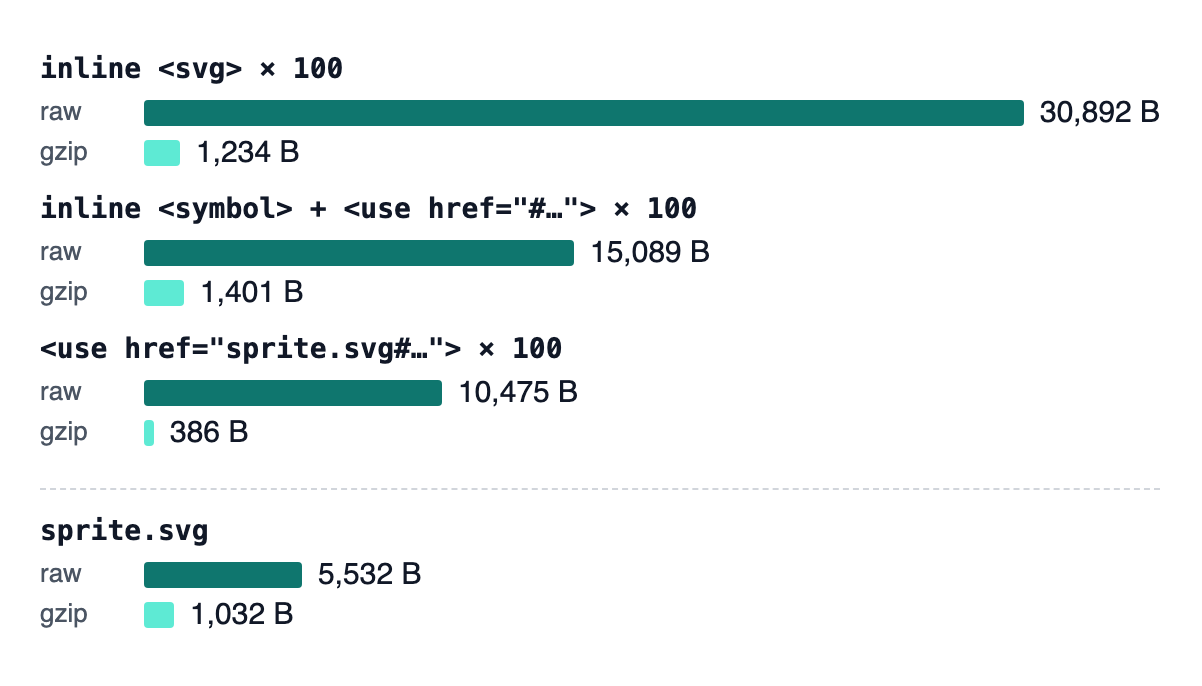
sprite.svg. Raw bytes and gzip level 9.The surprising result is the second line. Once gzip is on, an inline sprite transferred slightly more than plain inline icons, because gzip already compresses repeated path data very well. The raw HTML is still about half the size, which means less to parse, but on the network an inline sprite is roughly a wash.
The real saving comes from the external file. After the first page view, each additional page carries only 386 gzipped bytes of icon markup instead of 1,234, and the sprite comes from cache.
On a site where people view many pages, that adds up. On a single-page app it matters much less.
The savings are in the markup, not in rendering. Each <use> still creates a copy of the symbol’s content in a shadow tree for the browser to lay out and paint, so a sprite does not make 1,000 icons cheaper to draw.
Only ship the icons you use
It is tempting to generate a sprite from an entire icon set. Running the script below over all 4,985 Tabler outline icons produces a 1,840,403-byte sprite.svg, 224,739 bytes gzipped. That downloads before the first icon can appear.
A five-icon sprite (home, bell, search, settings, user) from the same script is 1,841 bytes, or 550 gzipped. Build the sprite from the icons your templates actually reference.
Build the sprite with a script
You can build a sprite without any dependency. This Node script (Node 18+, ES modules) reads a folder of SVGs, keeps each file’s viewBox, copies the styling attributes the children inherit from the root <svg> onto the <symbol>, strips Tabler’s invisible bounding-box path, and writes a single file. It produced the sprites measured above, and the 4,985-symbol output passes xmllint --noout.
// build-sprite.mjs — usage: node build-sprite.mjs ./icons ./public/sprite.svg
import { readdir, readFile, writeFile } from 'node:fs/promises';
import path from 'node:path';

const [srcDir, outFile] = process.argv.slice(2);
const INHERITED = ['fill', 'stroke', 'stroke-width', 'stroke-linecap', 'stroke-linejoin'];

const files = (await readdir(srcDir)).filter((f) => f.endsWith('.svg')).sort();

const symbols = await Promise.all(
  files.map(async (file) => {
    const svg = await readFile(path.join(srcDir, file), 'utf8');
    const open = svg.match(/<svg\b[^>]*>/)?.[0];
    const viewBox = open?.match(/viewBox="([^"]+)"/)?.[1];
    if (!viewBox) throw new Error(`${file}: no viewBox`);

    // Copy root styling attributes so the children still inherit them
    const attrs = INHERITED
      .map((name) => open.match(new RegExp(`\\s${name}="([^"]*)"`)))
      .filter(Boolean)
      .map((m) => m[0].trim())
      .join(' ');

    const inner = svg
      .slice(svg.indexOf(open) + open.length, svg.lastIndexOf('</svg>'))
      .replace(/<path stroke="none" d="M0 0h24v24H0z" fill="none"\s*\/>/, '') // Tabler's invisible box
      .replace(/\s*\n\s*/g, '')
      .trim();

    const id = `icon-${path.basename(file, '.svg')}`;
    return `<symbol id="${id}" viewBox="${viewBox}" ${attrs}>${inner}</symbol>`;
  })
);

await writeFile(outFile, `<svg xmlns="http://www.w3.org/2000/svg">${symbols.join('')}</svg>\n`);
console.log(`${symbols.length} symbols -> ${outFile}`);
The regex approach works for icon sets exported by tools, where every file has the same shape. For hand-drawn or messy files, run SVGO first, and check for id attributes inside the icons: two symbols that both define <clipPath id="a"> will conflict once they share one document (why duplicate IDs break). If you prefer an existing tool, svg-sprite and vite-plugin-svg-icons handle ID prefixing and optimization for you.
Put a content hash in the file name (sprite.3f9a1c.svg) and serve it with a long Cache-Control: max-age. The sprite then stays cached until an icon actually changes.
Styling through the shadow tree
The content a <use> produces lives in a shadow tree. That has two consequences, and most sprite styling bugs come from not knowing about them:
- Inheritance works. Properties such as
color,fillandstrokeflow from the outer<svg>into the copy. Because the symbols usestroke="currentColor", settingcoloron a parent recolors the icon, including hover states. - Selectors do not. A page rule like
.icon path { stroke: red }does not match the paths inside the shadow tree. You cannot target “the second path of this icon” from the page. - Attributes on the symbol beat inherited values. The symbols above carry
stroke-width="2", so.icon { stroke-width: 1.5 }has no effect. If you want stroke width controlled from CSS, leave that attribute off the symbol and set it on.iconinstead.
.nav-link       { color: #334155; }
.nav-link:hover { color: #4f46e5; }   /* stroke="currentColor" follows this */

/* Two-tone icons: custom properties inherit into the <use> shadow tree */
.icon--alert { --icon-accent: #ef4444; }
Size the outer <svg> like any inline icon; the em-based sizing CSS is in the sizing guide.
For two-tone icons, use CSS custom properties, which also inherit into the shadow tree. Inside the symbol, reference the variable from a style attribute (real CSS, so var() is supported) with currentColor as the fallback:
<symbol id="icon-bell-dot" viewBox="0 0 24 24" fill="none" stroke="currentColor"
        stroke-width="2" stroke-linecap="round" stroke-linejoin="round">
  <path d="M10 5a2 2 0 1 1 4 0a7 7 0 0 1 4 6v3a4 4 0 0 0 2 3h-16a4 4 0 0 0 2 -3v-3a7 7 0 0 1 4 -6" />
  <path d="M9 17v1a3 3 0 0 0 6 0v-1" />
  <!-- style="" is real CSS, so var() works here; a bare fill="var(...)" attribute is not reliable -->
  <circle cx="18" cy="5" r="3" stroke="none" style="fill: var(--icon-accent, currentColor)" />
</symbol>
Now <svg class="icon icon--alert"><use href="#icon-bell-dot"/></svg> draws the bell in the text color and the dot in red. Without the modifier class, both use the text color. In Chromium, the plain icon had no red pixels and the one with the modifier had 433, all in the dot:

<symbol> used twice at 96px in Chromium, text color #1f2937. Right: with icon--alert, which sets --icon-accent: #ef4444.Inline or external?
- Inline sprite: no extra request, works when a page is opened from
file://, and gradient IDs resolve without surprises. It is re-sent with every page. Best for single-page apps and small sites. - External sprite: one cached file shared by every page. Best for multi-page, server-rendered sites. It must be served from the same origin as the page: browsers refuse cross-origin
<use>references, and CORS headers do not change that. A sprite on a separate CDN domain will not load. Chrome can also block it when you open a page directly from disk, so test on a local server.
If your assets have to live on another domain, fetch the sprite with JavaScript and inject it into the page as an inline sprite. That turns it into the first case.
Using a sprite from React
Sprites are not only for plain HTML. In a React app with a lot of repeated icons (a data table with an icon in every row, say), a sprite keeps the path data out of your JavaScript bundle entirely. A tiny typed wrapper keeps call sites clean and prevents typos in icon names:
// Icon.tsx — sprite served from /public/sprite.svg
type IconName = 'home' | 'bell' | 'search' | 'settings' | 'user';

export function Icon({
  name,
  size = 24,
  label,
  ...props
}: React.ComponentPropsWithoutRef<'svg'> & { name: IconName; size?: number; label?: string }) {
  return (
    <svg
      width={size}
      height={size}
      aria-hidden={label ? undefined : true}
      role={label ? 'img' : undefined}
      aria-label={label}
      {...props}
    >
      <use href={`/sprite.svg#icon-${name}`} />
    </svg>
  );
}
Accessibility works the same as for any inline SVG. Decorative icons get aria-hidden, meaningful standalone ones get role="img" and a label on the outer <svg>. Do not rely on a <title> inside the <symbol>: text inside the shadow tree is not reliably exposed to assistive technology.
Six ways a sprite breaks
- Hiding the sprite with
display:noneand then wondering why a gradient icon is blank. Use a zero-size, absolutely positioned container. - Hosting the sprite on a CDN subdomain.
<use>does not follow CORS, so it must be same-origin. - Hard-coded colors in the symbols. If a symbol’s paths carry
fill="#000", no amount of CSS on.iconwill recolor them. Convert tocurrentColorwhen building the sprite. - Duplicate IDs across symbols. Masks and gradients from different source files often share names like
aorclip0. Prefix them per icon. - Shipping the whole icon set. As measured above, that is 1,840,403 bytes for Tabler outline alone.
- Forgetting the size on the outer
<svg>. Withoutwidth/height(or CSS), the icon falls back to a default size and usually looks far too big.
When a sprite is the right tool
Reach for a sprite when a fixed set of UI icons repeats across many server-rendered pages, when you want icon markup out of your JavaScript bundle, or when you are working without a component framework. If you are already using a component library such as Lucide or Tabler in React, per-icon components are simpler and tree-shake automatically. Only switch to a sprite if profiling shows icon markup is a measurable cost.
Tabler even publishes a prebuilt @tabler/icons-sprite package, which is handy for prototypes. For production, build your own subset.
To assemble a subset without cloning a whole icon repository, you can export the individual SVGs you need, for example from Icony (multi-select, then ZIP), and run them through the build script above.